Samsung Galaxy Tab S12 Ultra Review: A Powerful Android Tablet With a Stunning Display
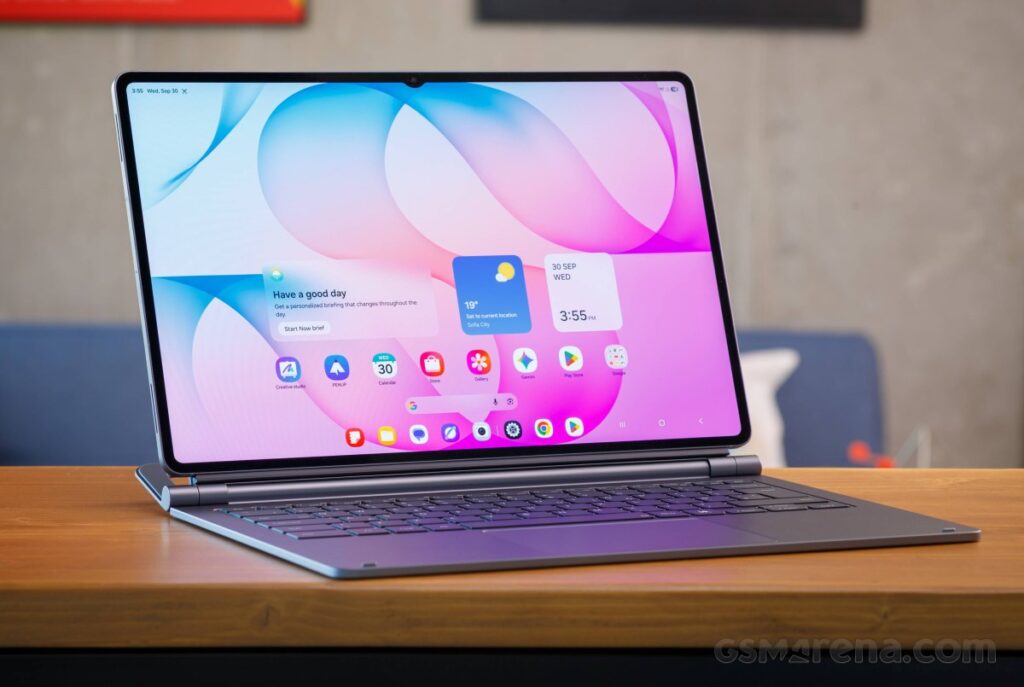
The Samsung Galaxy Tab S12 Ultra delivers a premium tablet experience built around a massive AMOLED display, powerful performance and advanced multitasking features. However, despite its impressive hardware, the latest Ultra model faces a familiar challenge: convincing users that a high-end Android tablet can genuinely replace a traditional laptop.
Design and Display: A Large Screen That Makes a Difference
The Galaxy Tab S12 Ultra continues Samsung’s approach to premium tablet design, combining a slim aluminium body with a large 14.6-inch Dynamic AMOLED 2X display. With a resolution of 2960 × 1848 pixels and a 120Hz refresh rate, the screen is designed to deliver sharp images, smooth animations and vibrant colours.
The expansive display is particularly appealing for watching films, browsing the web, reading documents and working with multiple applications simultaneously. HDR10+ support also enhances compatible video content, providing a more immersive viewing experience.
Despite its large dimensions, the tablet maintains a remarkably thin profile. Nevertheless, its size can make prolonged handheld use less comfortable, especially when reading or watching videos without placing the device on a desk or stand.
Performance: Built for Demanding Tasks
Powering the Galaxy Tab S12 Ultra is MediaTek’s Dimensity 9500 processor, paired with 12GB of RAM in the entry-level configurations. Higher-end versions offer additional memory and storage, while microSD expansion provides extra flexibility for users with large files and media libraries.
In everyday use, the tablet is designed to handle multitasking, demanding applications, gaming and productivity workloads with ease. Its powerful hardware also makes it suitable for users who regularly switch between browser tabs, document editors and entertainment applications.
The performance improvements over its predecessor are welcome, although they do not necessarily represent a dramatic generational leap. For owners of an already capable premium tablet, the differences may not be substantial enough to justify an immediate upgrade.
Software and Productivity: Can It Replace a Laptop?
Samsung’s One UI 9, based on Android 17, provides the software foundation for the Galaxy Tab S12 Ultra. The interface includes tablet-focused features, multitasking tools and Samsung DeX, which offers a desktop-style environment for compatible applications.
DeX allows users to work with resizable windows and organise applications in a layout that feels closer to a traditional computer. Combined with a keyboard and mouse, this setup can make the tablet a practical option for writing, managing emails, editing documents and handling everyday office tasks.
The included S Pen adds another layer of versatility. It allows users to take handwritten notes, annotate documents, sketch illustrations and interact with the interface more precisely.
However, the Android application ecosystem remains a limitation for certain professional workflows. Some desktop applications and advanced editing tools still provide a more complete experience on Windows or macOS computers. The optional keyboard accessory also increases the overall cost of the setup.
For students, journalists, content creators and professionals who primarily work with mobile applications, the Galaxy Tab S12 Ultra can be a capable productivity device. Those who depend on specialised desktop software may still need a conventional laptop.
Cameras and Connectivity
The Galaxy Tab S12 Ultra features a dual rear-camera system comprising a 13MP main camera and an 8MP ultrawide camera. On the front, a 12MP ultrawide camera is designed for video calls, online meetings and selfies.
Although tablet cameras are rarely the main reason to purchase a premium device, the front-facing camera remains important for remote work and virtual meetings. The rear cameras can also be useful for scanning documents, photographing notes and capturing occasional images.
Connectivity options include Wi-Fi 7, Bluetooth 6.0 and 5G support on compatible models. These features provide flexibility for users who need fast wireless connections or internet access while travelling.
The tablet also carries an IP68 rating for dust and water resistance, adding reassurance for everyday use. However, water resistance does not make the device immune to damage under every condition.
Battery Life and Charging
A large 11,600mAh battery powers the Galaxy Tab S12 Ultra, supporting extended use for productivity, streaming and web browsing. Actual battery life depends on screen brightness, network conditions, application workloads and other settings.
The tablet supports 45W wired charging, although a compatible power adapter may need to be purchased separately. This is worth considering when calculating the total cost of ownership.
For users who spend long periods working away from a desk, battery capacity is an important advantage. Nevertheless, demanding games, high brightness and continuous mobile connectivity can consume power more quickly.
Price and Value for Money
With a starting US price of approximately $1,399 for the 256GB Wi-Fi model, the Galaxy Tab S12 Ultra occupies the premium end of the Android tablet market.
Its large AMOLED display, powerful processor, included S Pen and extensive multitasking capabilities help justify its positioning. However, the price becomes harder to defend when buyers factor in the additional cost of a keyboard accessory.
The relatively modest changes compared with the previous generation also raise questions about value for existing Galaxy Tab Ultra owners. Buyers upgrading from an older tablet may appreciate the newer hardware and software, while those who already own a recent model may find fewer compelling reasons to switch.
Verdict: One of the Most Capable Android Tablets, but Not for Everyone
The Samsung Galaxy Tab S12 Ultra combines premium construction, an impressive 14.6-inch AMOLED display, strong performance and versatile productivity features in a single device. Its S Pen support and DeX environment make it particularly attractive to users who want a tablet capable of handling more than entertainment and casual browsing.
However, its high price, substantial dimensions and limitations within the Android application ecosystem prevent it from being a universal laptop replacement.
Should you buy the Samsung Galaxy Tab S12 Ultra?
If you want a large-screen Android tablet for multitasking, digital drawing, media consumption and mobile productivity, the Galaxy Tab S12 Ultra is an appealing choice. Existing owners of recent Ultra models, however, should carefully consider whether the improvements justify the upgrade.
Ultimately, Samsung’s flagship tablet excels at delivering a premium Android experience, but its value depends on how much you need its enormous display and advanced features.